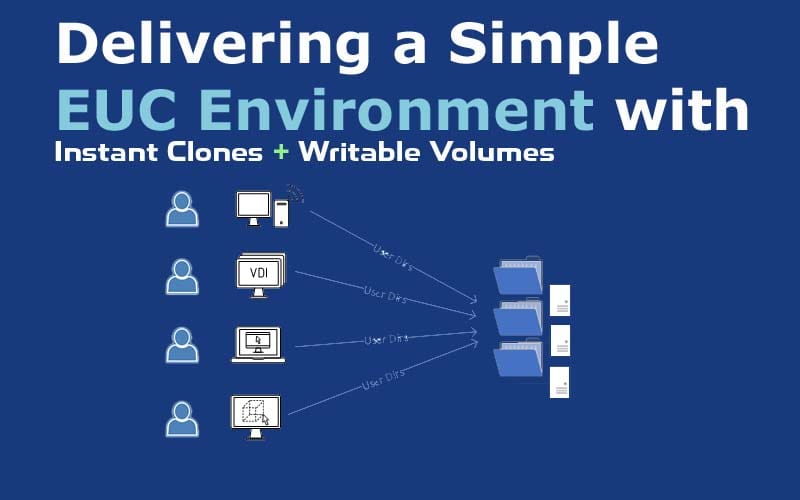
Delivering a Simple EUC Environment with Instant Clones and Writable Volumes in Omnissa Horizon.
Designing a modern End-User Computing (EUC) environment requires balancing simplicity, scalability, and user experience. Traditional persistent desktops have long been used to retain user data, but they introduce complexity, higher costs, and operational overhead. A more efficient approach is to leverage non-persistent desktops while ensuring user data persists independently.
This article explores a practical and simplified design using Omnissa Horizon Instant Clones and App Volumes Writable Volumes templates, demonstrating how organizations can reduce reliance on persistent desktops while maintaining a consistent user experience.
Why Move Away from Persistent VDI Desktops?
Persistent desktops provide a dedicated environment for each user, but they come with several challenges that impact scalability and manageability:
- High storage consumption due to full desktop allocation per user
- Increased patching and maintenance effort
- Inconsistent desktop states over time
- Reduced flexibility in scaling environments
Because of these limitations, many organizations are adopting floating, non-persistent desktop models.
Instant Clones and Floating VDI Desktops
With Instant Clones in Omnissa Horizon, administrators can deploy floating (non-persistent) desktops that are created on demand and refreshed after each user session. This model improves efficiency by enabling rapid provisioning, where desktops are generated within seconds from a centralized golden image. Since all clones share the same base image, storage usage is significantly reduced, and patching becomes much simpler—administrators only need to update the golden image once to apply changes across the environment.
Writable Volumes in App Volumes
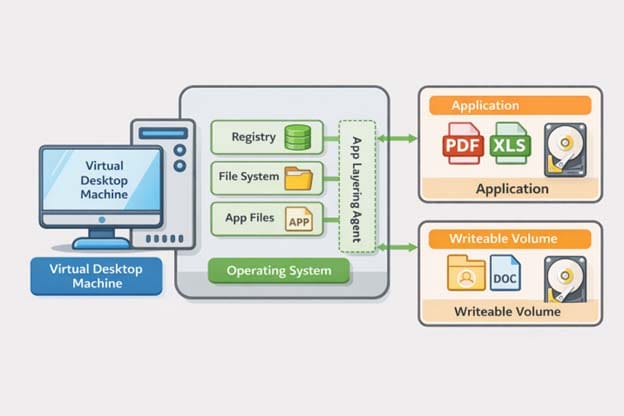
This is where Writable Volumes in App Volumes come into play. A Writable Volume is an empty VMDK or VHD file assigned to a specific user and dynamically attached at login to any virtual desktop in the pool.
When a user logs in, the Writable Volume mounts automatically, allowing their user profile, applications, and customizations to be loaded into the session. Any changes made during the session are written back to the volume. When the user logs out, the desktop is destroyed as part of the non-persistent model, but the Writable Volume remains intact, preserving the user’s data independently of the desktop.
This approach enables a balance between stateless desktops and stateful user data, effectively reducing the need for persistent desktops in many scenarios.
Benefits of Writable Volumes as a User Profile Solution:
- Eliminates the need for additional user profile tools (like Dynamic Environment Manager), as Writable Volumes act as the persistent Windows profile
- Ensures a consistent user experience with the same profile attached each session
- Reduces operational complexity with fewer components to manage and maintain
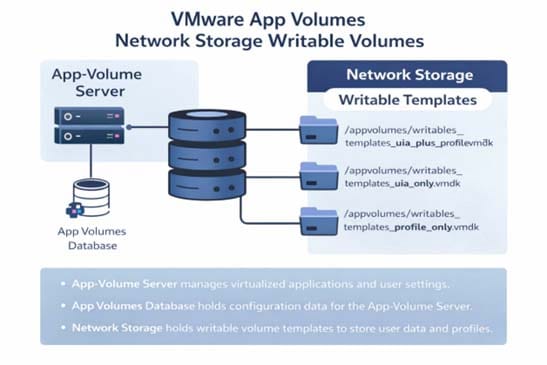
This image illustrates the App Volumes control‑plane and storage workflow that links servers, databases, and network storage to deliver user profiles through writable‑volume templates.
Summary of App Volumes template types:
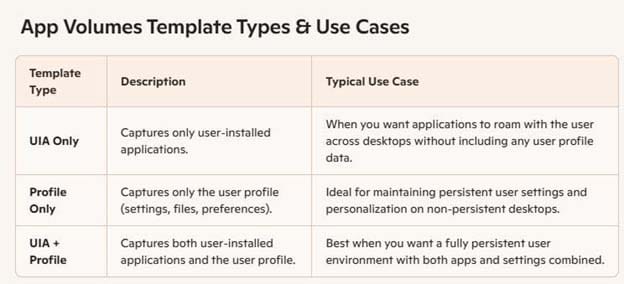
Recommended User Profile Management Approaches
It is important to note that while Writable Volumes can be used for user profile storage in certain use cases, the recommended and widely adopted methods for managing user profiles in modern EUC environments typically include:
- Dynamic Environment Manager (DEM) within Omnissa Horizon
- FSLogix user profile containers
These solutions provide more granular control, better performance optimization, and improved reliability for profile management at scale. They are generally considered best practice for enterprise environments.
Use Case: Secure Access for Vendors and Offshore Developers
This approach provides secure, controlled access for vendors and offshore developers by using Horizon Instant Clones to deliver non‑persistent desktops that reset after each session, ensuring no data remains on endpoints. App Volumes Writable Volumes add lightweight persistence for user settings, offering a balance of security, compliance, and usability. It’s especially effective for call centers, task‑based roles, development and testing environments, cost‑optimization efforts, and rapid deployments. However, Writable Volumes can grow over time, carry some risk of profile corruption, require proper backup and monitoring, and offer less flexibility than DEM or FSLogix.
Streamlined EUC Deployment with Expert Guidance
Accelerate EUC delivery by partnering with experienced providers like Datacompute Consulting, specializing in Omnissa Horizon and Citrix Virtual Apps and Desktops. We design scalable architectures, build production-ready Instant Clone pools, optimize golden images, and implement structured Writable Volumes for efficient user profile and data management.
Conclusion
By combining Instant Clones with Writable Volumes templates, organizations can create a simplified EUC environment that reduces dependency on persistent desktops while maintaining user personalization. Although solutions like Dynamic Environment Manager and FSLogix remain the recommended standards for profile management, Writable Volumes offer a viable alternative in specific scenarios where simplicity and speed are key.